How Long Does an Instagram Growth Service Take? Day 1, 7, 30
Quick answer
No Instagram help page we read gives a number of days for a paid growth service, so the schedule must come from the provider. Record a baseline on day 1, read the 7-day preset after a week and judge with the 30-day preset.
- No published day count: get the schedule in writing.
- Check at day 7, 14 and 30 with Insights presets.
- Total followers growth needs at least 100 followers.
On this page12 sections
None of the Instagram or Meta pages we read states how long a paid growth service takes, so any promised number of days is the provider’s own. What you can do is read your account on a fixed schedule: record a baseline on day 1, open the 7-day preset in Instagram Insights after a week, and judge with the 30-day preset at the end of the first month. This guide covers what Insights can and cannot show at each of those points, 5 things that slow visible growth and 6 questions that make any provider put its schedule in writing.
For the methods behind these services, see how Instagram growth services work. For the difference between a purchased count and real followers, see buy Instagram followers: real vs fake and 7 checks. This page is about time: what to expect to see, and when.
How long does an Instagram growth service take?
The honest answer is that it depends on the provider’s delivery schedule, and no public Instagram source sets one. Instagram’s help pages describe how to measure growth, not how fast a paid service can add it. We looked for a published figure on Instagram’s and Meta’s pages and found none, so this article does not offer one.
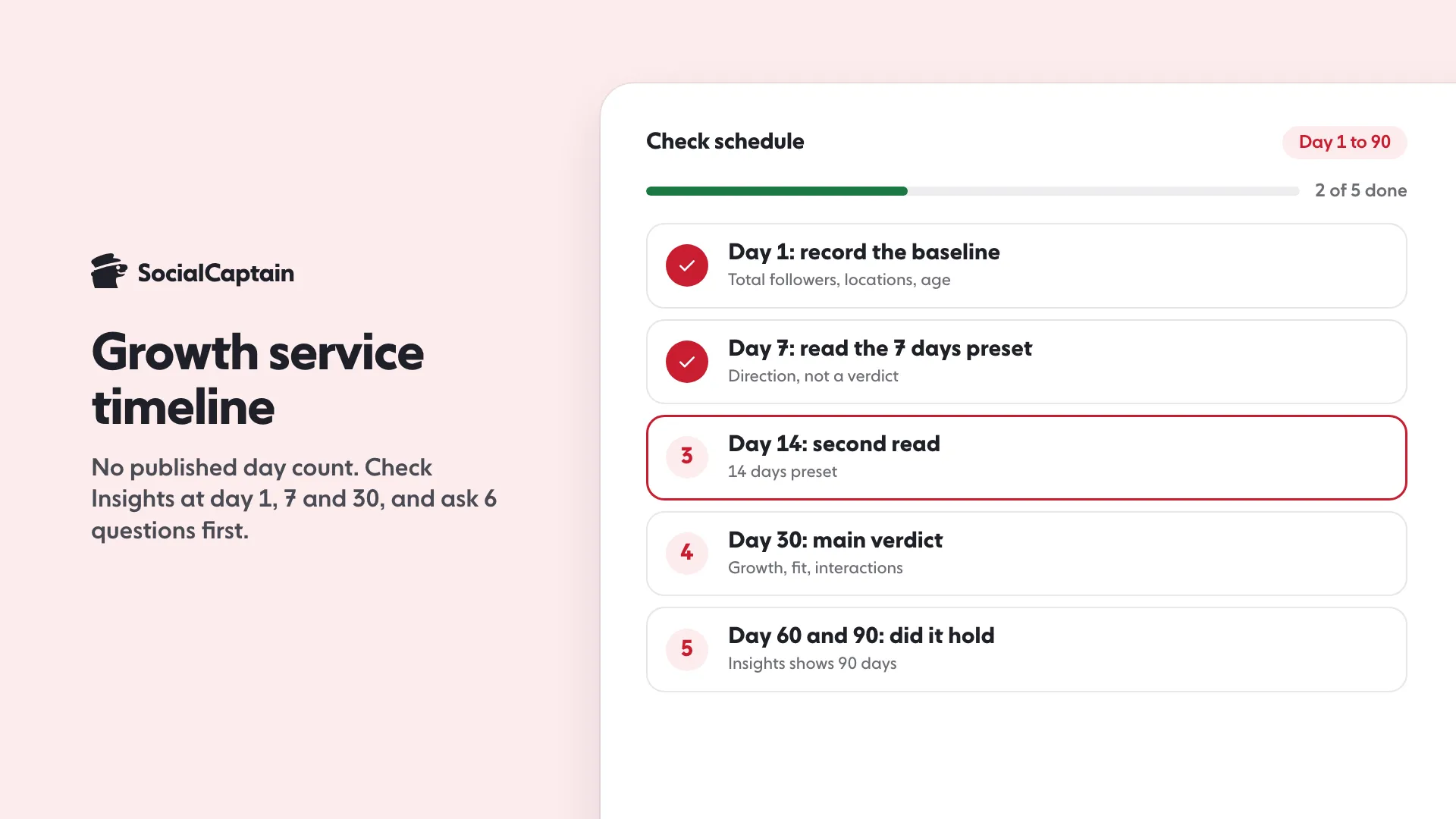
That leaves two things you control. The first is getting the schedule from the provider before you pay. The second is checking the result in a way that is fair to a service that adds followers over time, rather than judging it by a single glance on day 2. The timeline below is a checking schedule built on what Instagram’s tools actually show, not a speed claim.
| When | What to do | Insights tool to use |
|---|---|---|
| Day 1 | Record the baseline | Overview: Total followers, top locations, age range |
| Day 7 | First read, mainly of direction | 7 days preset, New followers |
| Day 14 | Second read | 14 days preset |
| Day 30 | The main verdict | 30 days preset: Total followers growth, Interactions, Accounts engaged |
| Day 60 and 90 | Confirm it held | 60 and 90 days presets; the last chance to see day 1 |
Instagram’s help page on date ranges lists these presets: “You can choose from 7 days, 14 days, 30 days, 60 days or 90 days.” The check points above simply use them.
What can you see in Insights on day 1?
On day 1 you are not measuring growth. You are creating the “before” picture, which matters because Insights shows only the past 90 days. Its help page says account insights can be viewed “for any time period within the past 90 days”, with a custom range also “within the past 90 days.” If you start a service and wait three months to look, the early days are no longer there to compare.
What to record, from the Insights overview that Instagram’s page says includes “Views, Interactions, New followers, and Content you shared”:
- Total followers, and if you have at least 100, the growth line (followers gained or lost), top locations, age range and the times your followers are most active.
- New followers for the last 30 days, so you know the normal rate before any paid help.
- Interactions (Instagram defines these as “likes, comments, saves and shares”) and Accounts engaged, so you can later tell whether new followers react.
- Content you shared, the number of posts, stories and reels in the period, because a change in how much you post will muddy the result.
Take screenshots. It takes two minutes and it is the only way to keep a record beyond 90 days.
One limit applies at the very start. Instagram says Total followers trends are available “when you have at least 100 followers.” Below 100 followers the growth, locations and age range breakdown is not promised; the page does not say what the overview shows, so check what your own account displays. The page also notes that Insights are described for public accounts. If you are under 100 followers, your first checks rely on the overview numbers and the profile itself.
What can you see after 7 days?
After a week, read direction, not a result. Choose the 7 days preset and look at New followers and Total followers growth. You are checking one question: did the line move up compared with your baseline period?
Do not expect the demographic breakdown to be complete. Instagram’s help page says: “To view audience demographics, use preset timeframes and reach over 100 accounts. If you can’t see audience demographics for Last 7 days, you can try choosing a longer preset timeframe such as Last 30 days, Previous month or Last 90 days.” If the 7-day view is empty, the account has not yet reached enough people for Instagram to show the breakdown. That is a data limit, not proof that nothing happened.
At day 7 also check these:
- Did a dip happen? Instagram’s creators FAQ says that when you share a reel, followers see it first, and “others might choose to unfollow as people regularly curate the accounts they follow. This may result in some initial follower loss”. It adds: “Be patient and don’t get discouraged by short-term metrics.” A small movement down in a single week does not tell you a service failed.
- Did the provider do what it said it would on day 7? If it promised a start date and a pace, this is when you hold it to that. See the questions below.
What can you see after 14 days?
Day 14 is a useful second sample because it doubles the data without waiting for the full month. Use the 14 days preset. If the 7-day and 14-day lines are both rising, you have a trend. If one week rose and the next fell back, note it and wait for day 30.
Also compare against your own baseline, not against other accounts. Followers gained and lost are net numbers in the Total followers growth line, so a steady inflow with some normal unfollows still shows as a rise if the inflow is larger.
What can you see after 30 days?
Day 30 is the main verdict because it gives the most information in a window Instagram supports. Open the 30 days preset and read four things:
- Total followers growth. Followers gained or lost over the 30 days, against your day 1 baseline.
- Top locations and age range. The fit check. If the account serves a niche in one country and language, the locations under Total followers should look like that audience. A growth service that adds followers from far outside your market has delivered a number, not the audience you wanted.
- Accounts engaged. For posts, stories and Live, Instagram says this can be broken down into followers and non-followers. Watch whether the followers side moves.
- Interactions. Likes, comments, saves and shares over the period. A larger audience that never reacts is a sign that the people were not a fit.
Followers that engage are the practical test of quality. Instagram’s creators FAQ explains what drives reach: “the most important things we consider are how much engagement per viewer the content has received (through actions such as watch time, sharing, following, liking, commenting, profile visits, etc) and how likely the viewer will be to watch and engage with that piece of content.” A set of followers who never engage does not help the next post, which is why growth that fits the account matters more than growth that only raises a count.
What does a “month” look like on day 60 and 90?
Day 60 and day 90 answer a different question: did it hold? Use the 60 days and 90 days presets and compare Total followers growth with day 30. If the line keeps rising or stays level, the followers are staying. If it falls back after the service finishes, ask the provider what its policy is for followers who leave.
Ninety days is also the edge of what Insights can show, so after that you can no longer reopen the earliest days. Your day 1 screenshots become the baseline.
What slows the result you can see? 5 things
None of these is a claim about how fast any service works. They are points where the number you see can lag the work being done, drawn from Instagram’s own pages.
- Fewer than 100 followers. Total followers trends, including growth and locations, need at least 100 followers. Before that you see less.
- Fewer than 100 accounts reached. Audience demographics need over 100 accounts reached or engaged. A small account may see an empty breakdown for the last 7 days.
- A window that is too short. The presets run 7 to 90 days. A one-week look at a growth that arrives gradually will always look smaller than a 30-day one.
- Normal unfollows. Instagram says people regularly curate the accounts they follow. Growth is a net figure, so losses in a week reduce the line even when new followers arrive.
- The account itself. Instagram says posting frequency is one factor of many, and that among creators with the greatest net follower growth rates, on average, they post “10 or more reels per month.” Instagram does not link this to paid services, but it is a reminder that what you post affects how the audience responds. If you stop posting during a campaign, you give new followers little to react to.
For the other direction, see why you may be losing followers, and for what works alongside a service, how to get more Instagram followers.
6 questions to ask any growth service about timing
Because no public source sets a speed, the provider has to. Ask these before paying and keep the answers:
- When does delivery begin after I pay? An hour, a day, a week? Get it in writing.
- Over what period are followers added, and how many? A number of followers over a number of days, not “fast”.
- Is the pace steady or in bursts? Followers arriving all at once on one day look different in Insights from a steady rise, and you should know which to expect.
- What happens to followers who unfollow? Is there a refill, a credit, or nothing?
- What do you need from me? A username, a public profile, a minimum number of posts?
- What does the refund cover, and for how long? A money-back promise that ends before the delivery period does is not much of a promise.
A provider that answers in specifics gives you something to verify at day 7, 14 and 30. A provider that answers “it varies” gives you nothing to hold it to. The best Instagram growth services list uses criteria of this kind.
Be careful of promises phrased as speed alone. A fast delivery of followers who do not fit your niche, country or language does not help the account. SocialCaptain sells real people from the customer’s niche, country and language, never bots, and its own pages are the place to read what it states about delivery. This article makes no claim beyond them. See the Instagram growth service page for what is stated.
A simple checking routine, step by step
- Day 1. Screenshot Insights for the last 30 days: Total followers, New followers, top locations, age range, Interactions, Accounts engaged. Note the date and the provider’s promised start and pace.
- Day 7. Open the 7 days preset. Record New followers and the growth line. If demographics are empty, switch to 30 days and note it.
- Day 14. Same read with the 14 days preset. Compare with day 7.
- Day 30. Read the 30 days preset against day 1: growth, locations, age range, Accounts engaged, Interactions. Decide whether the audience fits.
- Day 60 and 90. Check it held, and save a final set of screenshots.
What does SocialCaptain cost?
SocialCaptain sells growth as Starter and Pro plans. On the first payment, the 6-month plan is $27.99 a month on Starter and $39.99 a month on Pro, and the monthly plan is $47.99 on Starter and $68.99 on Pro. The first payment carries a 14-day money-back guarantee. See the pricing page for the live plans.
FAQ
Is there an official number of days for an Instagram growth service?
None of the Instagram or Meta pages we read gives a number of days for a paid service, so the honest answer comes from the provider’s written schedule. What you can do is read your own account: a baseline on day 1, the 7-day preset in Insights after a week, and the 30-day preset after a month.
Can you see follower growth in Instagram Insights straight away?
Only with enough followers. Instagram says Total followers trends, including growth (followers gained or lost), are available when you have at least 100 followers. Instagram says the overview includes New followers for a preset timeframe.
Why did my follower count dip at first?
Instagram’s creators FAQ says that when a reel is shared, some followers may unfollow as people regularly curate the accounts they follow, which may cause some initial follower loss. It adds that as the content reaches more people who do not follow you, the likelihood of new followers goes up.
How far back can Instagram Insights show?
Instagram says account insights cover any period within the past 90 days, with presets of 7, 14, 30, 60 or 90 days or a custom range. Screenshot your numbers on the day you start, because older days cannot be reopened.
What should you ask a growth service about timing?
Ask when delivery starts after payment, how many followers are added over what period, whether the pace is steady or in bursts, what happens to followers who unfollow, what the provider needs from you, and what the refund covers.
Does posting more speed up a growth service?
Instagram does not say so. Its creators FAQ says that among creators with the greatest net follower growth rates, on average, they post 10 or more reels per month, and that frequency is one factor of many. It does not tie that to paid services.
Sources
- About Instagram insights facebook.com
- Select a date range for your account insights on Instagram help.instagram.com
- Instagram for Creators: Frequently Asked Questions creators.instagram.com
Related guides
Growth services
How Instagram Growth Services Work: 5 Methods Explained
Growth services
Buy Instagram Followers: Real vs Fake and 7 Checks
Follower growth
Why Am I Losing Instagram Followers? 9 Causes and Fixes
Written by Jonas Revel
Research editor
Jonas Revel runs research on the SocialCaptain blog: the statistics pages, account safety, and the fact-check every article gets before it goes live. Each number is traced to its original source and dated, and figures that cannot be traced are left out.
All articles by Jonas Revel


