Instagram Theme Page: 4 Ways to Earn, 5 Content Rules
Quick answer
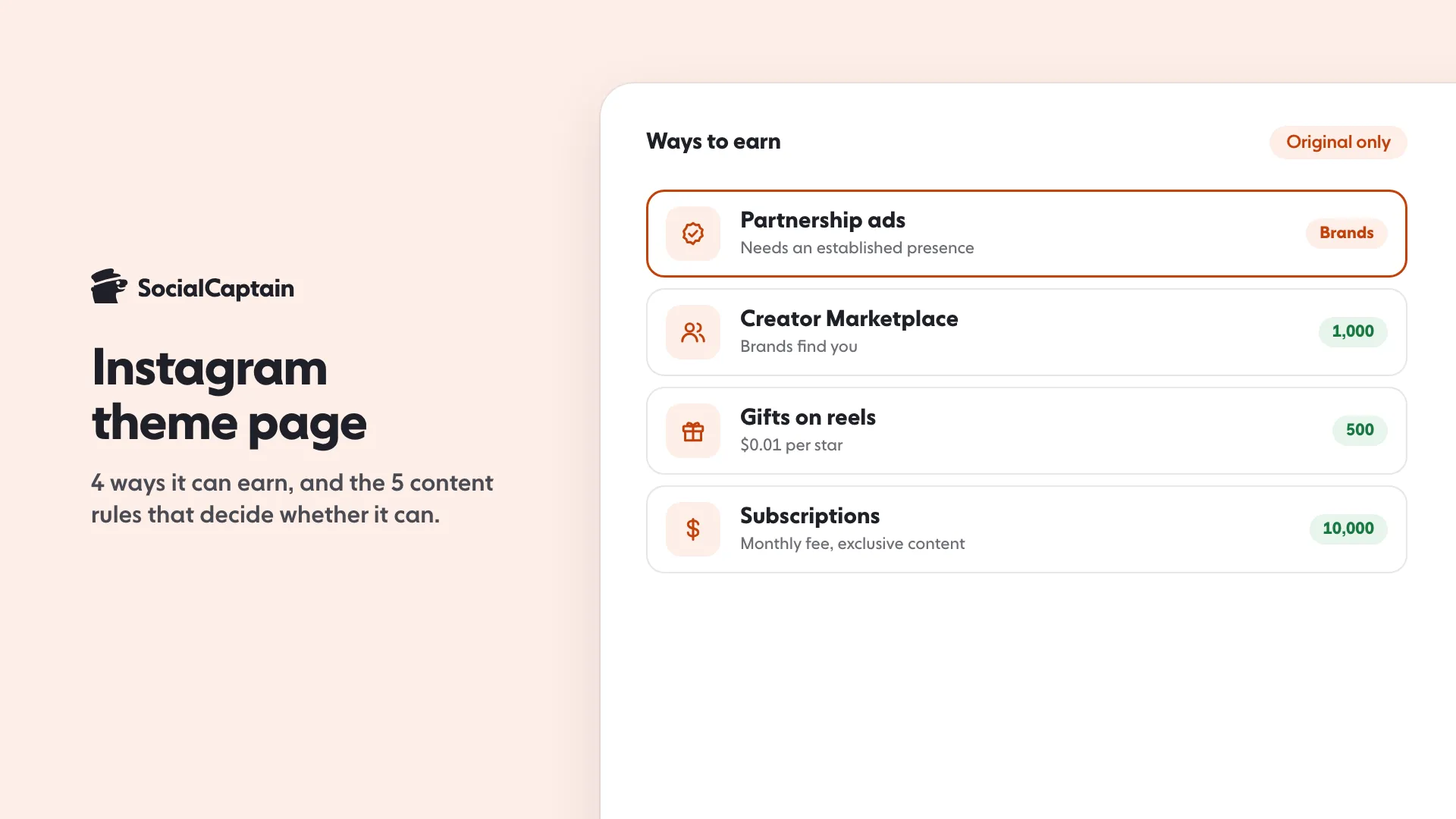
An Instagram theme page can earn through branded content and partnership ads, Creator Marketplace (1,000 followers), Gifts on reels (500) and Subscriptions (10,000). Instagram says unoriginal content cannot be monetized, so a theme page needs its own posts or a material edit.
- 4 ways to earn, from 500 to 10,000 followers.
- Unoriginal content cannot be monetized.
- Credit is not permission; accounts cannot be sold.
On this page12 sections
An Instagram theme page can earn through 4 of Instagram’s own routes: branded content and partnership ads, Creator Marketplace (which asks for 1,000 followers), Gifts on reels (500 followers) and Subscriptions (10,000 followers). Whether a theme page is allowed to use any of them depends on 5 content rules that Instagram has written down, mostly about originality. The short version: a page that makes its own posts, or adds something real to other people’s, can earn. A page that reposts other accounts’ content as its own cannot.
A theme page is an account built around a topic, a style or a type of humor instead of one person. This guide covers how the earning side works, what Instagram says about content you did not make, what US copyright law adds, and a 6-step start plan with a worked example. For earning on a personal or brand account, see how to make money on Instagram.
What are the 4 ways a theme page can earn?
Instagram lists five monetization tools on its eligibility page: Badges, Bonuses, Creator Marketplace, Gifts and Subscriptions. Branded content and partnership ads sit alongside them. Four fit a theme page, and each has its own entry bar.
| Way to earn | What Instagram says you need | What you get |
|---|---|---|
| Branded content and partnership ads | A professional account that follows Community Standards, shares accurate information and has an “authentic, established presence … a sufficient follower base” | Brand partnerships on your posts |
| Creator Marketplace | At least 18 years old, a professional and public account, a minimum of 1,000 followers, agreement to the Partner Monetization Policies | A way for brands to find you |
| Gifts on reels | A professional account, 18 or older, at least 500 followers, a payout account set up, an available country | Revenue share of $0.01 USD for every star fans send |
| Subscriptions | A professional account with at least 10,000 followers, 18 or older, an available country | A monthly fee from followers for exclusive content |
Badges (for Live videos) and Bonuses (by invitation, in test countries) exist too, but they depend on going live or on being invited, so they rarely drive a theme page.
Two details change the picture for a theme page:
- Partner Monetization Policies require “authentic engagement”. Instagram says creators “can only monetize content consumed by their natural, authentic audience” and “may lose the ability to monetize if their audience significantly consists of fake engagement, including, but not limited to, likes, follows, and views”. Theme pages that grow by bought followers are the clearest case.
- There is no stated minimum for partnership ads. Instagram says “a sufficient follower base” and gives no number; brands set their own bar.
For the full list of tools and who qualifies, see Instagram monetization: 5 built-in tools and requirements.
How does each earning route work for a theme page?
The table gives the entry bar. This section gives what each route asks of a page that is about a topic rather than a person, with the steps Instagram publishes.
Branded content and partnership ads
A brand pays you to feature it, or lets you run a post as an ad from your account. Instagram’s rule is that organic branded content must carry the paid partnership label. To use it, you enable branded content in your settings, follow the Branded Content Policies, and your brand partner must have a professional account.
To tag a brand on a reel, Instagram’s steps are: after you have selected your video and added a caption, tap Next, tap More options, tap Add paid partnership label and turn the toggle on, then tap Add brands manually or Add a brand from a project. You can add up to 2 brands. The first time you tag a brand, a request goes to that brand; until it approves, the post carries the label without the brand’s name.
Creator Marketplace
Creator Marketplace is where brands search for creators. From your profile in the Instagram app, Instagram’s steps are: tap Professional dashboard, tap Branded content, tap Join creator marketplace, tap Accept to make your information and insights visible to brands, tap Accept changes and accept the Terms. If you do not see the option, Instagram says the feature is not available to you yet. After joining, you can pick preferred brand partners and set up a creator portfolio. Brands can then see the content you have posted and insights such as your average reach and number of followers, and message you.
For a theme page, the portfolio is the pitch: the topic, the audience and the best posts.
Gifts on reels
Viewers buy stars and send them on your reels. Instagram pays “$.01 USD for every star received” as a monthly revenue share. Two limits on the help page matter here: collaborative posts and accounts that primarily post content focused on children are not eligible to earn from Gifts, and you must live in a country on Instagram’s list.
Subscriptions
Followers pay a monthly fee for exclusive content. Instagram offers a 14-day free trial, which creators can switch off under Professional dashboard, Subscriptions, Subscription details, and a “Next 5” promo of about 50% off for your next 5 subscribers. You need 10,000 followers, so this is a later step for most theme pages.
How do payouts work?
Instagram’s payouts page says earnings from Badges, Bonuses, Gifts and Subscriptions are paid out when you have set up a payout account, meet the policies and reach a minimum balance. In the US the minimum balance is $5. Outside the US it is $100 for a wire transfer and $25 for other payout methods. A balance under the minimum carries over to the next payout. Without a payout account you can earn up to $500 per monetization tool, with a maximum of $1,500 across 3 tools, and unclaimed earnings are forfeited after 6 months. Changing payout details places the account on a 5-day hold.
What would Gifts pay? A worked example
This is an example calculation, not a statistic, and it uses only Instagram’s published rate of $0.01 USD per star.
| Stars received in a month | Revenue share at $0.01 per star |
|---|---|
| 1,000 | $10 |
| 10,000 | $100 |
| 50,000 | $500 |
A theme page whose reels receive 20,000 stars in a month would earn $200 from Gifts that month. Instagram does not publish how many stars a page of a given size will receive, so the table shows the rate, not a forecast. Branded content is priced by the brand, so Instagram publishes no rate for it and this guide gives none.
What are the 5 content rules for a theme page?
1. Original content gets the best reach. Instagram says it encourages original content “to get the best reach and distribution”. Content is original when “it is created by the same account that posts it”. A reel you recorded and artwork you created are its own examples.
2. Content with a material edit is allowed. If you post content that someone else made, add something of your own that “meaningfully enhance[s] the entertainment, informational, or narrative value”. Instagram’s examples include adding commentary over a clip, adding text or narration throughout that adds new information, or a compilation of clips that tells a person’s life story or a top 10 list with added pricing or performance details. You can still reach people who do not follow you this way.
3. Unoriginal content is flagged and cannot be monetized. Instagram’s page says content is unoriginal “when it is re-shared without a material edit, or if the account that posted it had no role in creating it”. Its examples include:
- Borders that change the aspect ratio
- Logos, watermarks, or simply attributing the original creator
- Stickers, GIFs or unrelated visual elements
- Compilations of other accounts’ videos without material edits
- Screen-recording someone else’s video
The Content Monetization Policies add that “Content that is unoriginal or reproduced without making meaningful enhancements (commentary, parody, creative editing, etc.) cannot be monetized”. The same page lists formats that cannot be monetized at all: static videos, slideshows of images, looping videos and text montages. It also lists engagement bait, content that “incentivizes people to click a link or respond to a post through likes or comments”.
4. Credit is not permission. Instagram’s copyright help page says the best way to avoid copyright problems is to “only post content that you’ve created yourself”. It lists things that do not protect you, including giving credit to the copyright owner, adding a disclaimer, not intending to profit, modifying the work and finding the content on the internet. Instagram suggests getting written permission from the owner. It may remove reported content, and repeat infringers can lose their accounts.
5. The account cannot be sold. Instagram’s Terms of Use say you can’t attempt “to buy, sell, or transfer any aspect of your account (including your username)”. A theme page cannot be built to flip.
If your page has been posting unoriginal content, Instagram recommends three fixes: post content you created, make material edits, and repost instead of posting. A repost credits the original creator, and Instagram says reposting to your followers or sharing to Stories both ensure “the original creator receives credit and reach”.
What does copyright law say about posting other people’s content?
Instagram’s rules and copyright law are separate. Its original-content page says its guidelines “are separate from our intellectual property policies” and that “you are responsible for obtaining any necessary permissions before using someone else’s work”.
The US Copyright Office explains the main exception, fair use. It lists four factors that courts weigh: the purpose and character of the use, including whether it is commercial or nonprofit educational; the nature of the copyrighted work; the amount and substantiality of the portion used; and the effect of the use on the potential market for the work. It says courts evaluate fair use “on a case-by-case basis”, and that “transformative” uses, which “add something new, with a further purpose or different character”, are more likely to be considered fair.
Two points follow for a theme page. First, no formula protects you: the Copyright Office FAQ says “there are no legal rules permitting the use of a specific number of words, a certain number of musical notes, or percentage of a work”, and “in cases of doubt, the Copyright Office recommends that permission be obtained”. Second, only a federal court can determine whether a particular use is fair use. Instagram’s pages say copyright laws vary by country and that Instagram cannot give legal advice. This guide cannot either: if a post depends on a fair use argument, speak to a lawyer before you build income on it.
Which sources of content are safe for a theme page?
| Content source | Original by Instagram’s rules? | Copyright position | Can it be monetized? |
|---|---|---|---|
| Your own photos, footage or graphics | Yes | Yours | Yes, if the policies are met |
| Content you have written permission to use | Original only with your own material edits, or when made with approved partners | Covered by the owner’s written permission | Only the original or materially edited part |
| Another account’s reel with your commentary throughout | Materially edited if the commentary adds new information | Depends on the use; permission is the safe route | Only the material edit counts |
| Another account’s reel with a watermark and credit | Unoriginal | Credit does not protect you | No |
| Instagram’s Repost button or a share to Stories | The original creator is credited | Intended by the platform | Not your content, so not a source of income |
| A screen recording of someone’s video | Unoriginal | Not protected by credit | No |
The Repost feature is on the iPhone and Android apps, not on computers.
How do you start a theme page in 6 steps?
- Pick a topic with a real audience. A topic you can make 30 posts about without repeating yourself. The page’s value is the topic, so say it in the name and bio.
- Switch to a professional account. Every earning tool needs one. See creator vs business account for the choice. In the app, Instagram’s steps are: tap your profile picture, tap More to go to Settings and activity, tap Account type and tools below For professionals, select Switch to professional account, select your category and choose Creator or Business. Instagram notes that if your account is private, switching makes it public.
- Decide what is yours. Your own photos, your own footage, your own graphics, or content you have written permission to use. Anything else needs a material edit, and the edit has to add information, not just a watermark.
- Add your own value to every post. A line of commentary, a ranking, a comparison, a fact with a source. This is also what makes a post worth saving.
- Check Account Status and Monetization status. On the Instagram website, click More, then Settings, then Account Status below More info and support. It shows removed content and features you can no longer use, with a Request a review option. In the app, tap Menu, then Creator tools and controls (or Business tools and controls), then Monetization status, to see policy violations that affect your earning tools. You can request a review of all listed violations at once or one at a time.
- Grow with real people. Instagram’s monetization rules depend on a natural audience, so followers have to be real people interested in the topic. Collab posts can bring in another account’s audience; see Instagram collab posts.
Theme pages grow best when new viewers see the profile and recognize the topic at a glance. The free Instagram bio generator helps you write a bio that says what the page covers in one line.
Can trial reels help a new theme page?
Trial reels fit a theme page well. Instagram says they let you share a reel with accounts that do not follow you, you see insights within 24 hours, and you can share to everyone from the reel’s insights. A trial reel is evaluated independently and does not affect the ranking of your standard reels. Instagram asks for 200 followers on a professional account and 1,000 on a personal one.
Can a theme page get followers faster?
The slowest stretch is the start, when a good page has few people to see it. If you want real followers who match your niche, country and language, our Instagram followers service is built for that, and pricing lists the plans. It supports the work above and does not replace posting content that is yours. Bought numbers from fake accounts do the opposite: Instagram’s policy says a page can lose the ability to monetize if its audience significantly consists of fake engagement.
FAQ
What is an Instagram theme page?
It is an account built around one topic, such as a hobby, a city, a style or a type of humor, rather than around one person’s face or life. Instagram’s pages describe no separate account type for it, so a theme page is a normal account that can be switched to a professional one.
Can a theme page make money on Instagram?
Yes, if it meets Instagram’s tool requirements and posts content that counts as original. Branded content needs an established presence and a sufficient follower base, Creator Marketplace asks for 1,000 followers, Gifts for 500 and Subscriptions for 10,000.
Can I repost other people’s content on a theme page?
Instagram recommends reposting, which credits the original creator, or sharing to Stories. Posting someone else’s content as your own post without a material edit is flagged as unoriginal. Giving credit does not by itself fix a copyright problem.
Can a theme page be monetized if it only reposts?
No. Instagram’s Content Monetization Policies say content that is unoriginal or reproduced without meaningful enhancements, such as commentary, parody or creative editing, cannot be monetized.
Can I sell my theme page?
Instagram’s Terms of Use say you can’t buy, sell or transfer any aspect of your account, including its username. A sale of the account itself is against the rules it has published.
Does a theme page need a professional account?
Yes for every Instagram earning tool: Gifts, Subscriptions, Creator Marketplace and partnership ads all require a professional (business or creator) account.
Sources
- About original content on Instagram help.instagram.com
- Instagram Content Monetization Policies help.instagram.com
- How to make sure content you post to Instagram or Threads doesn't violate copyright law help.instagram.com
- Instagram Partner Monetization Policies help.instagram.com
- Eligibility requirements for partnership ads and branded content on Instagram and Facebook help.instagram.com
- Eligibility requirements for creators on Meta Creator Marketplace help.instagram.com
- How to earn money on Instagram Gifts help.instagram.com
- Eligibility requirements for Instagram Subscriptions help.instagram.com
- Terms of Use help.instagram.com
- Check your Account Status on Instagram help.instagram.com
- Set up a professional Instagram account to access business or creator tools and controls help.instagram.com
- How to check the monetization status of your Instagram account and your content help.instagram.com
- How to use the paid partnership label to tag organic branded content on Instagram help.instagram.com
- Get started as a creator on Meta Creator Marketplace help.instagram.com
- Manage your Subscription on Instagram help.instagram.com
- About payouts on Instagram help.instagram.com
- Share someone's post from feed to your Instagram story help.instagram.com
- Copyright help.instagram.com
- U.S. Copyright Office Fair Use Index copyright.gov
- Fair Use (FAQ) copyright.gov
- About product eligibility requirements for monetization tools on Instagram help.instagram.com
- About trial reels on Instagram help.instagram.com
- Repost a reel or a post on Instagram help.instagram.com
- About badges help.instagram.com
- About bonuses on Instagram help.instagram.com
Related guides
Written by Lena Ashby
Creator business and analytics editor
Lena Ashby covers the business side of Instagram on the SocialCaptain blog: Insights and engagement rates, when to post, content plans and how creators earn. Each article says where its figures come from and lists its sources at the end.
All articles by Lena Ashby


